Clarify Requirements
Currently, I am using three CDNs: Alibaba Cloud ESA, Tencent EdgeOne, and Cloudflare. The first two are domestic companies, and after domain备案 (filing), their performance within China is excellent. However, their domestic nodes can be a bit strained when serving international users, which led to the need for website automatic traffic splitting.
NS Settings
It is recommended to host your domain's NS records with Alibaba Cloud (or another NS provider that supports traffic splitting). Cloudflare does not support this, so if your domain is with Cloudflare, you'll need to move it elsewhere.
CDN Settings
Cloudflare
Due to Cloudflare's characteristics, to use its acceleration service, you need to bind a domain to Cloudflare. However, traffic splitting cannot be done with the domain you intend to use. Therefore, it is recommended to obtain a free IPv6 reverse DNS domain as an auxiliary domain. SSL is currently banned, but this is not an issue as long as you do not enforce HTTPS access on your server.
After adding the IPv6 reverse DNS domain, go to DNS and add your service. You can name it anything, just remember it. Simultaneously, enable the "little yellow cloud" (proxy status).
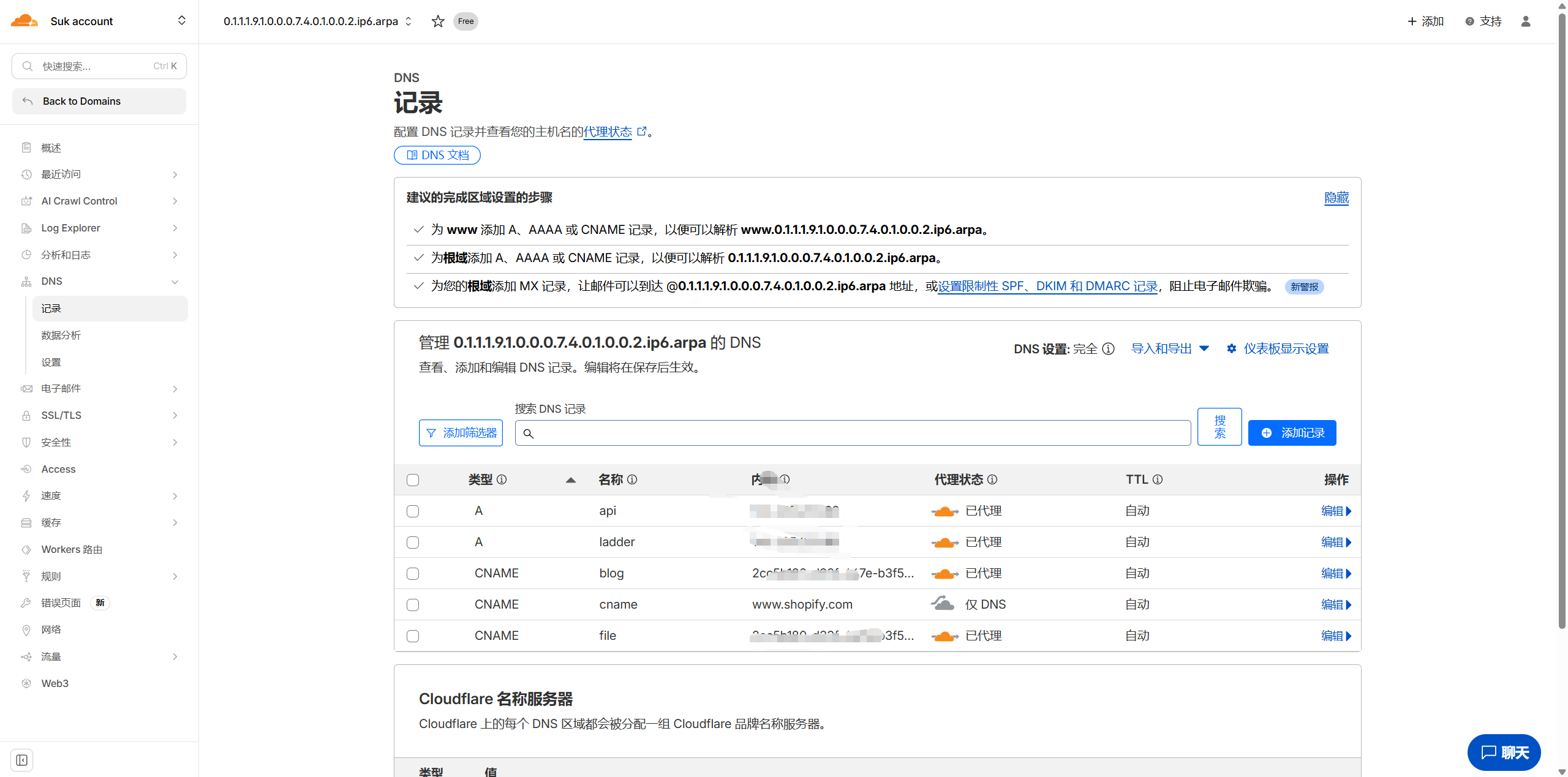
This is not all. Add a DNS-only record with any name that CNAMEs to www.shopify.com (i.e., turn off the "little yellow cloud").
This step is to optimize IP selection and speed up access.
Now, go to SSL, then Custom Hostnames. 
It seems you need to verify a credit card or PayPal. If you cannot do this, search on Xianyu (a second-hand marketplace). Normal usage is free and includes 100 subdomains, which is usually sufficient.
Then, set a fallback origin. Enter any auxiliary domain under your name that points to your server. 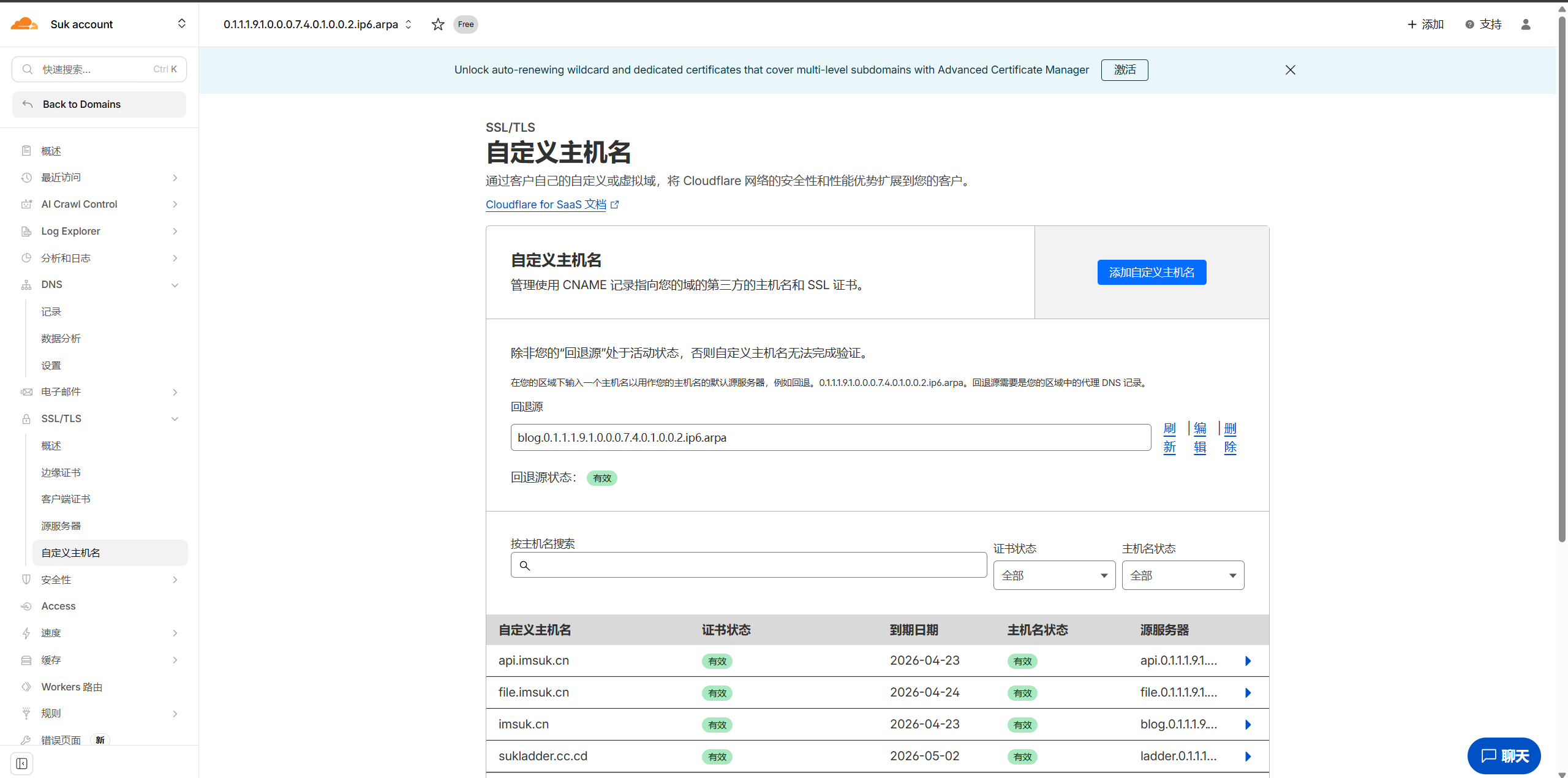
Next, add a custom hostname. The custom hostname is your traffic splitting domain. For certificate verification, select HTTP. If you don't mind the hassle, select TXT. For the custom origin server, enter the auxiliary domain that points to this service. For example, if you want to access my file website via file.imsuk.cn, and the domain pointing to the file website is file.0.1.1.1.9.1.0.0.0.7.4.0.1.0.0.2.ip6.arpa, then enter that. After completion, click "Add." The server does not need configuration; it uses the custom hostname for origin requests.

After configuring the service, go to your DNS provider and add a CNAME record. The value should be the domain you CNAMEd to www.shopify.com, for example, cname.0.1.1.1.9.1.0.0.0.7.4.0.1.0.0.2.ip6.arpa. For the host record, enter it normally.
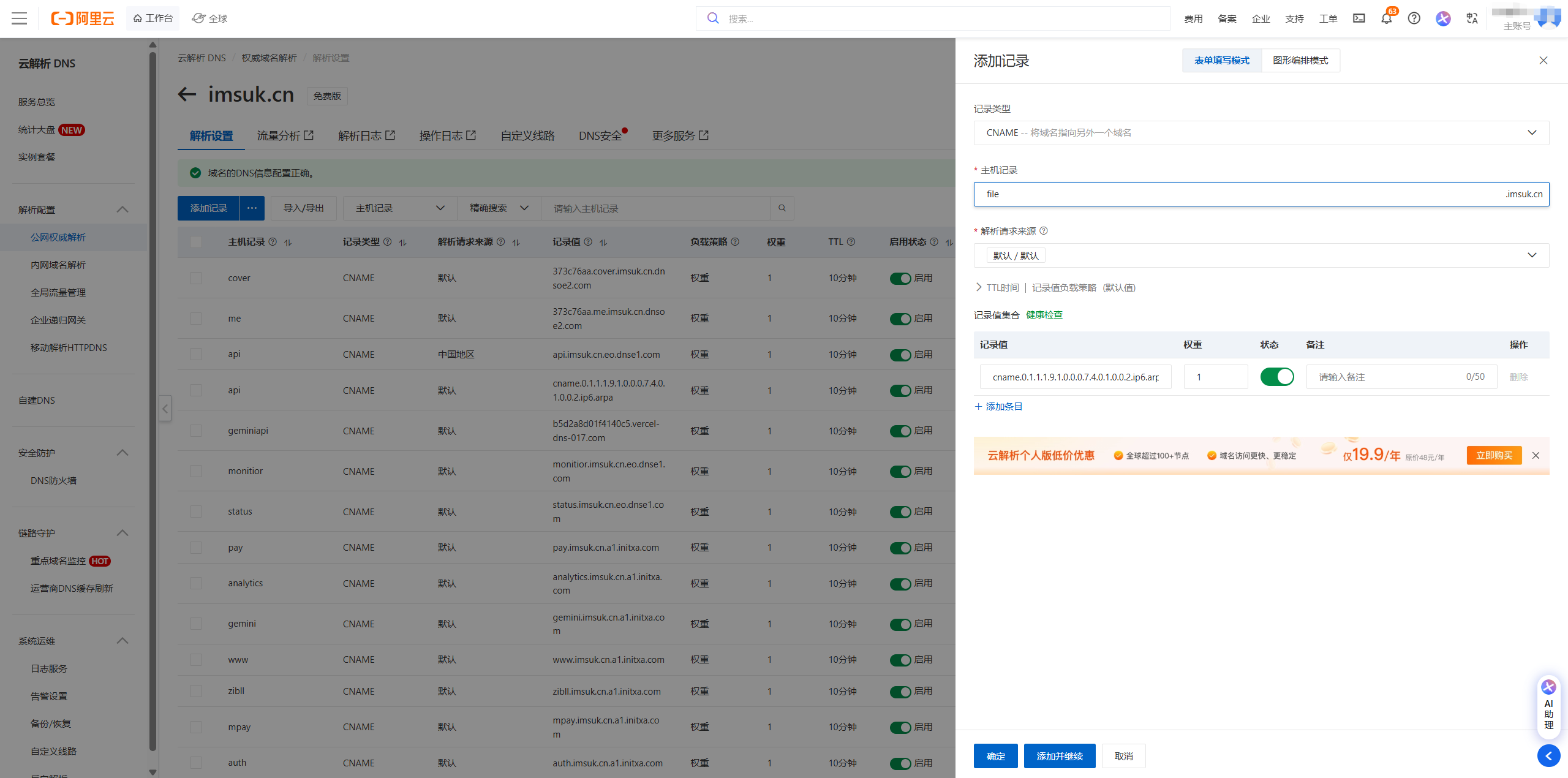
Now, the Cloudflare configuration is complete.
ESA
First, go to the ESA console and add your site. Select CNAME access and verify.
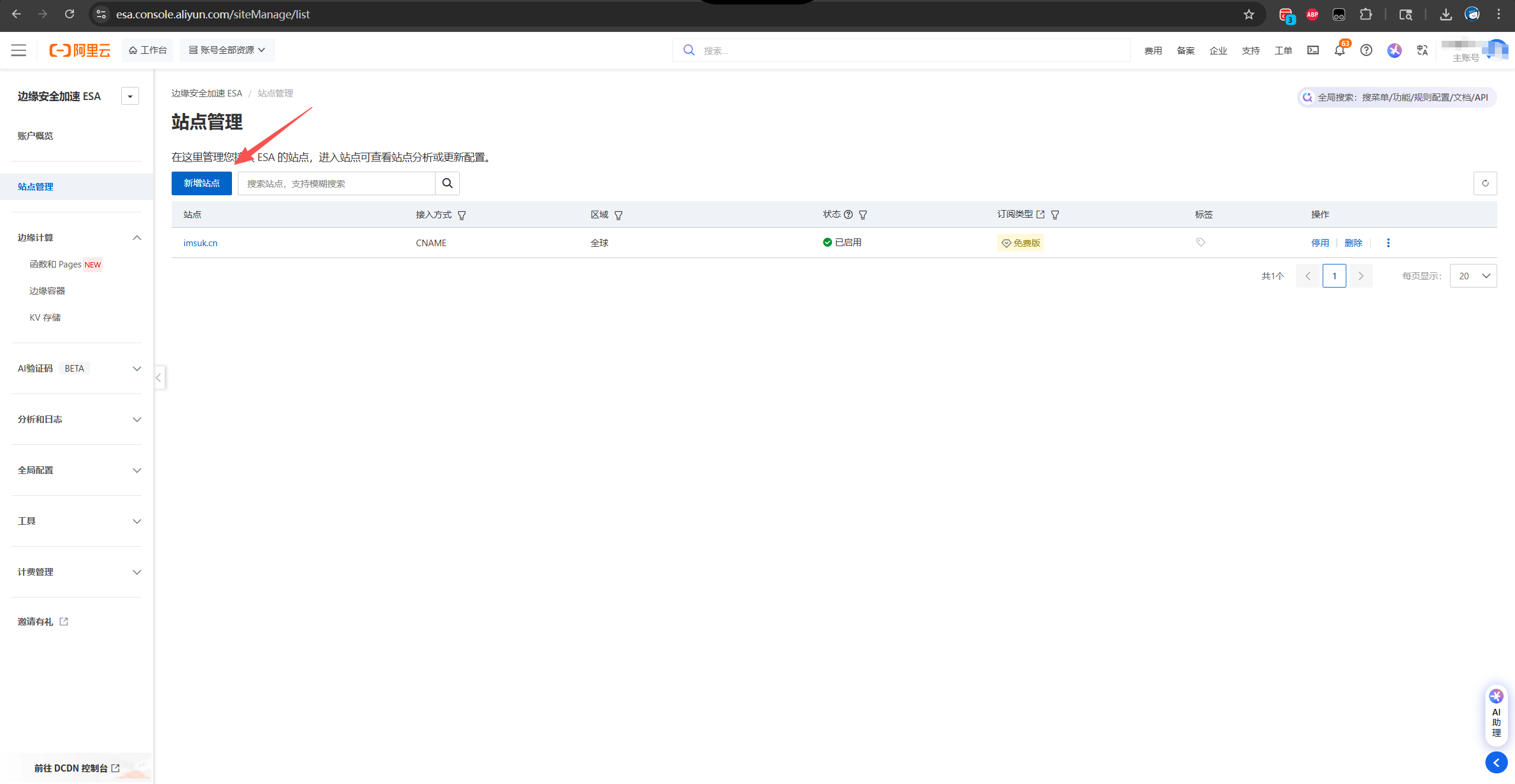
After configuring the site, click on the site name to enter the settings.
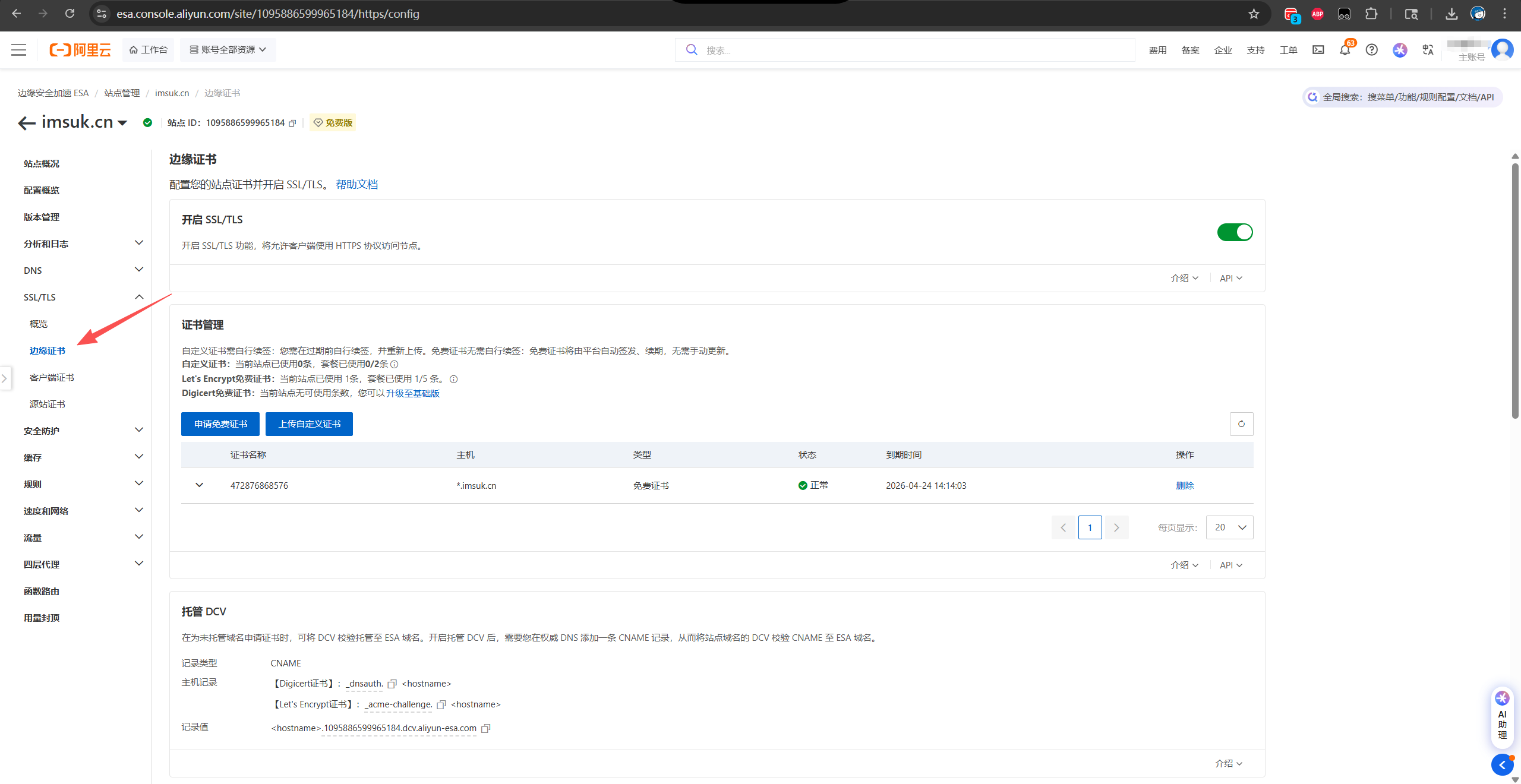
Find the Managed DCV setting and copy the record value. Open your DNS settings (e.g., Alibaba Cloud DNS resolution). Add a CNAME record with the name `_acme-challenge` and the value as your root domain plus the record value. For example:

After configuration, apply for a free certificate from Let's Encrypt in the certificate management above. Enter * in the certificate domain and click the wildcard domain below, then click confirm to apply for the SSL certificate.

Once completed, you can add services normally. After adding, you will get a CNAME address similar to **.a1.initxa.com. Go to your DNS provider to add the CNAME configuration. Fill in the other fields normally, but remember to select the China region for the request source.


EdgeOne
It's the same. Go to the console, add your site, and verify the configuration. Again, remember to select CNAME access here.

After configuration, directly add the services you want to add. You will get a CNAME address similar to **.cn.eo.dnse1.com.
Then go to your DNS provider and add the CNAME record. Here, also select the China region, but set the weight to 2. This will increase the success rate of EO's SSL issuance. Personally, I think EO's speed is faster than ESA, so I recommend setting a higher weight.
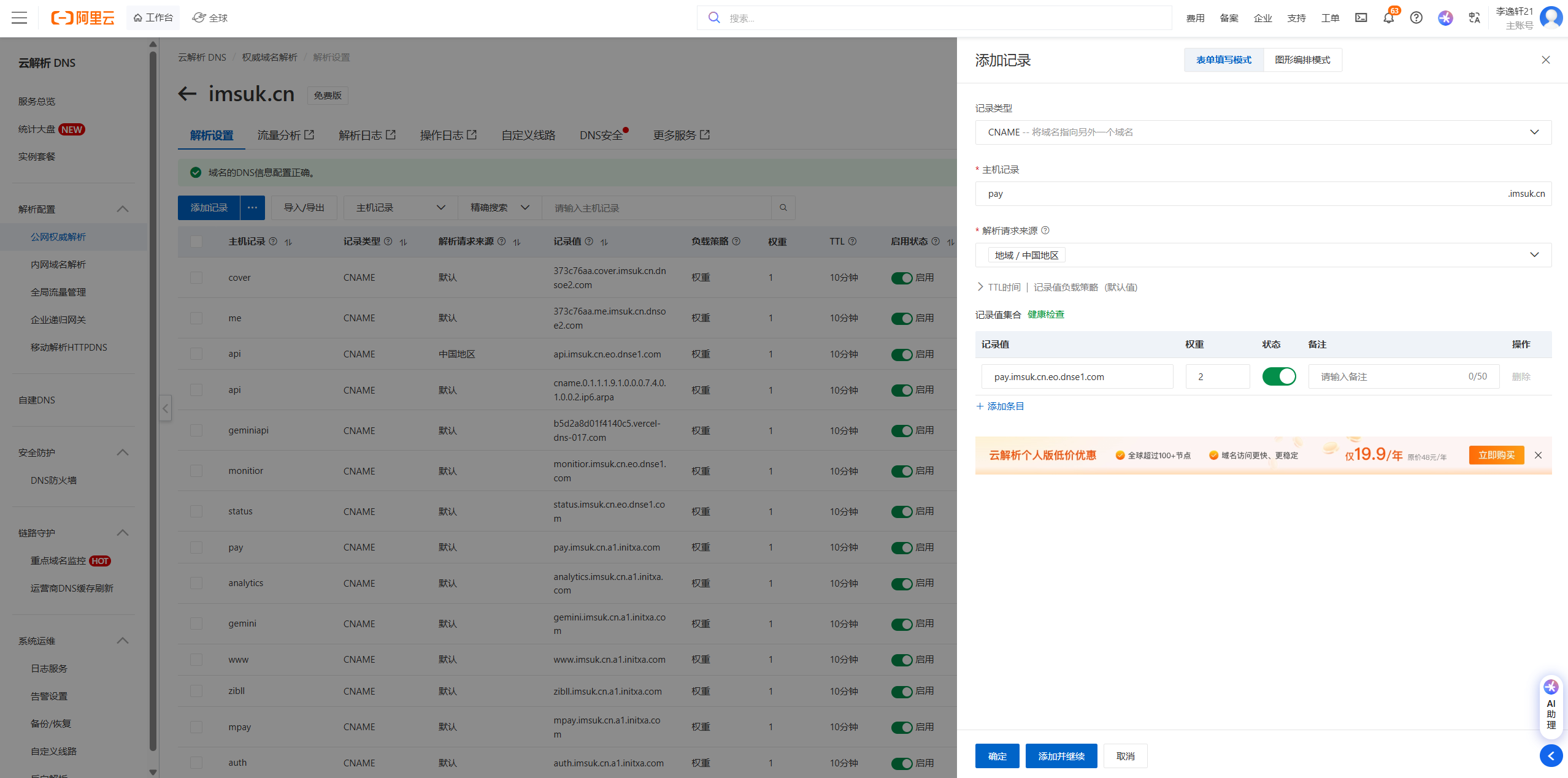
After adding, return to the EO console, click HTTPS configuration, select Edge HTTPS Certificate, and then select CNAME in the free certificate application.


Click save and wait for the SSL certificate to be issued. At this point, our traffic routing configuration is complete.
Testing
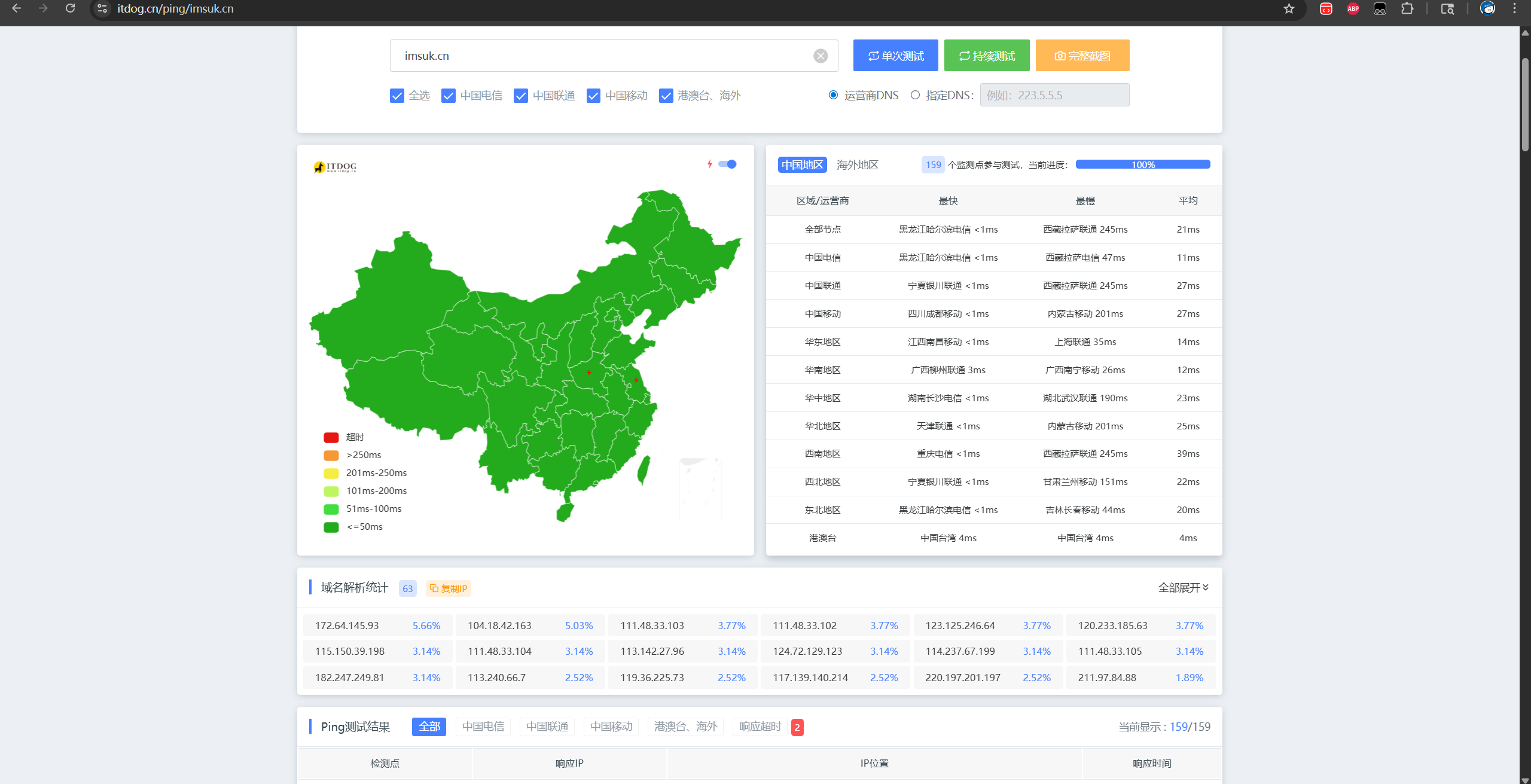
You can use ItDog for testing, but DNS updates have a delay. You should see different CDN providers, with Tencent or Alibaba Cloud in China and CF abroad. DNS will automatically update after 24 hours.
Adding CDN Display to Handsome Theme
CDN Settings
Cloudflare
Enter the rules for auxiliary domains.
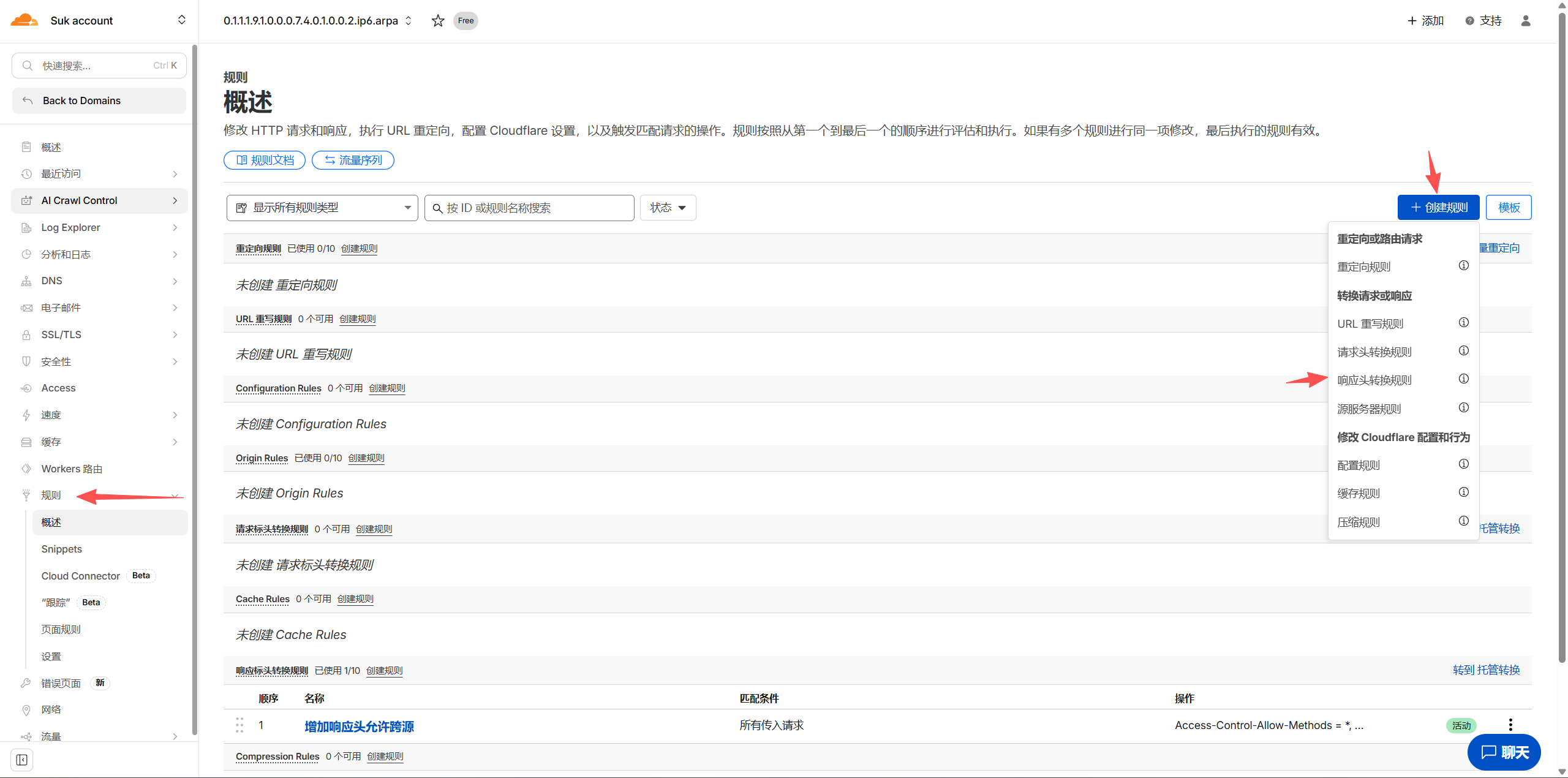
Click "Create Rule" and then "Transform Response Header". Give it a name. For all requests, modify the response headers to set static resources.
Set Access-Control-Allow-Methods to *, and Access-Control-Allow-Origin to *.your domain.

EdgeOne
Create a blank rule in the Rules Engine under Site Acceleration.

The matching type is HTTP request header, custom Origin equals .your domain, the operation is to modify the HTTP response header, the type is set, one name is Origin, and the other is Methods, Methods is set to , and Origin is set to ${http.request.headers["Origin"]}

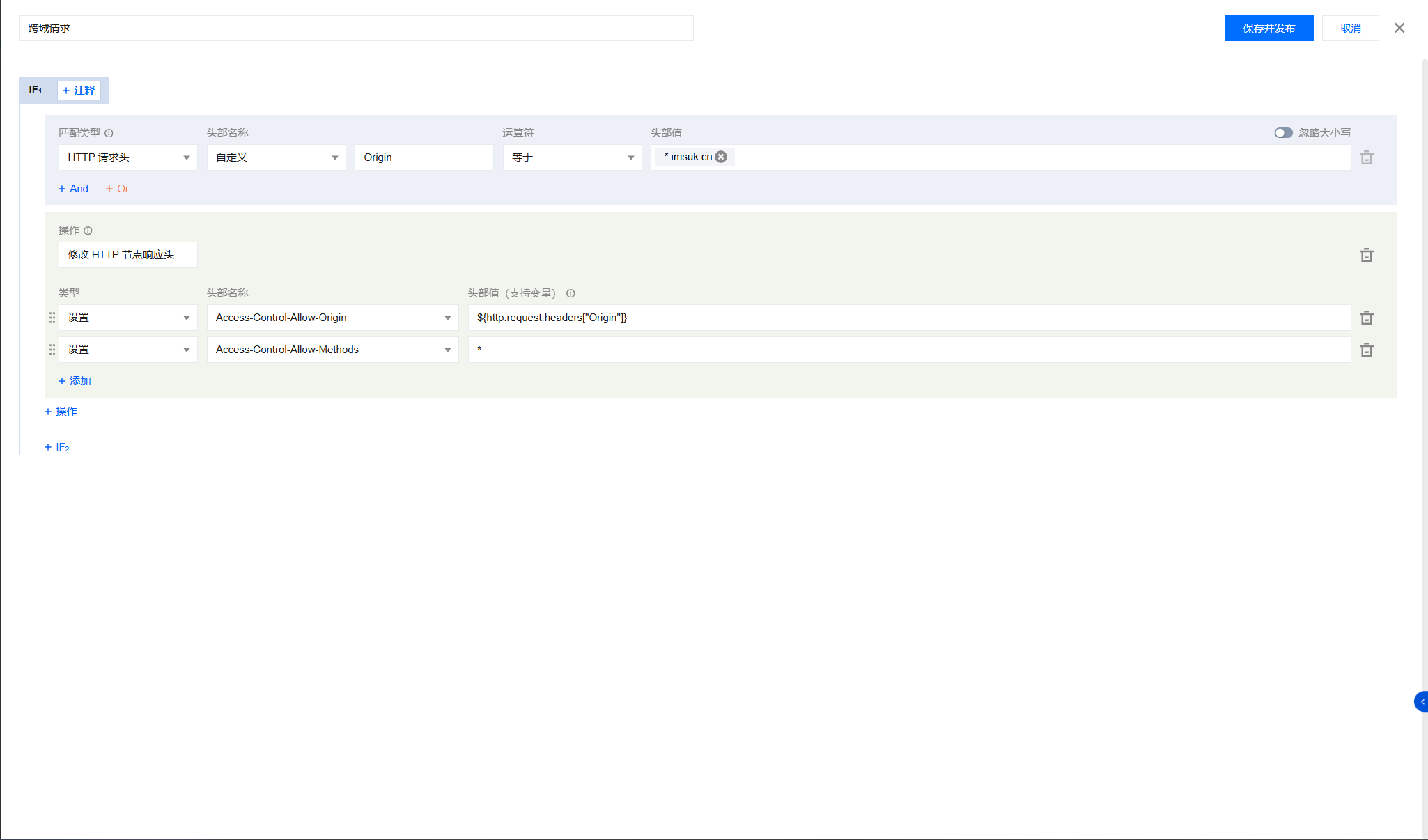
Then save and publish
ESA
Find the modification response header in the rule conversion rule and add a new rule
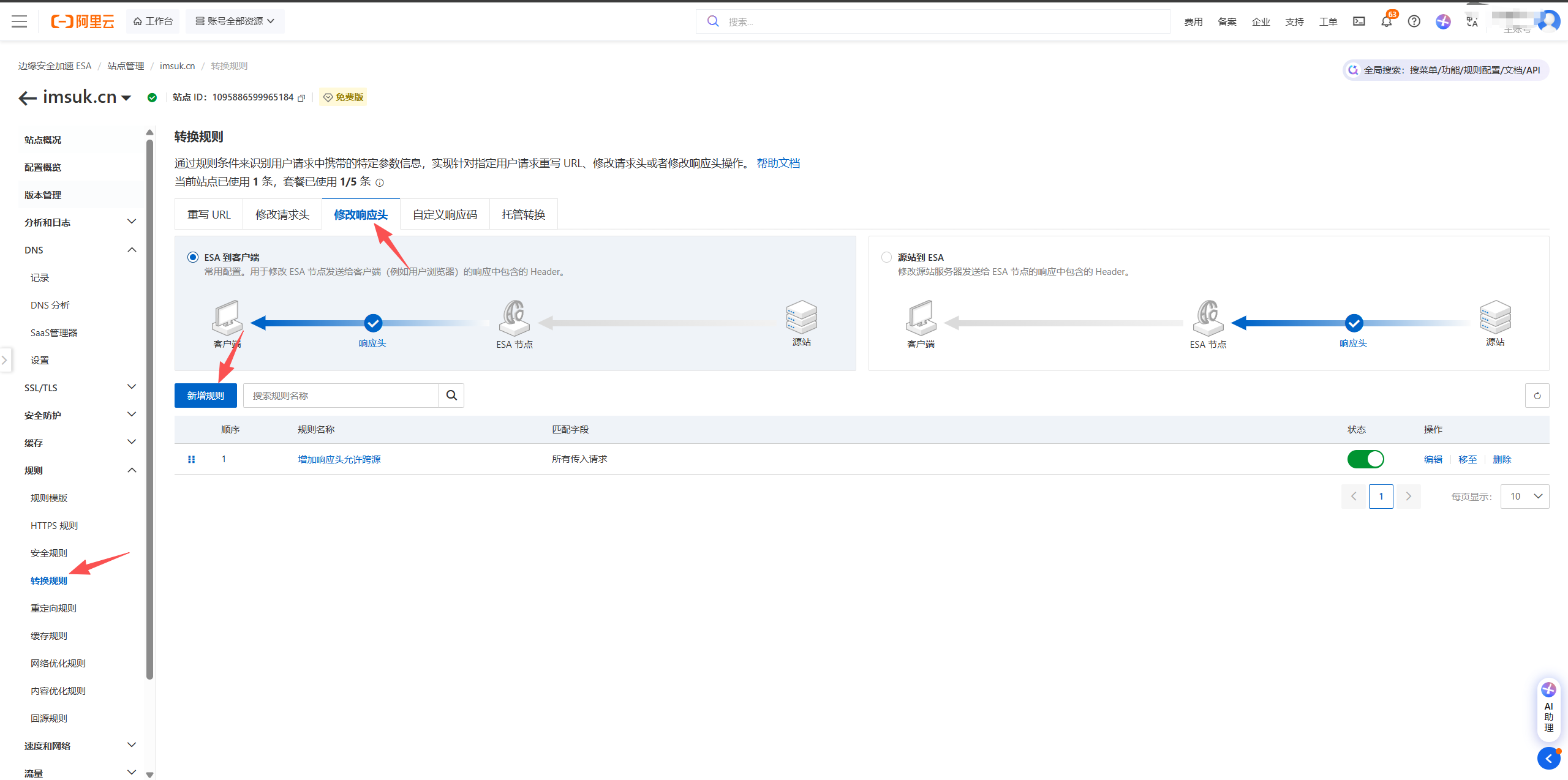
All incoming requests, static changes. Access-Control-Allow-Origin is .your domain, Access-Control-Allow-Methods is

Click OK to save
Theme Settings
Add at the bottom left or bottom right
<div class="github-badge" id="cdn-badge">
    <span class="badge-subject">This site is hosted by</span>
    <span class="badge-value bg-green" id="cdn-provider">Loading...</span>
</div>
This is the code that introduces CSS. Search for Handsome footer badge beautification online and add the CSS code.
Add in custom JavaScript
[hide]File[/hide]
See the effect in the bottom right footer of this site


2 comments
补充:阿里云DNS不建议使用,建议使用腾讯DNSPOD,Edgeone选择DNSPOD接入可以自动写dns验证,这样和阿里云分流时cname不会冲突
纠错:::服务器返回的Access-Control-Allow-Origin是 .imsuk.cn,但这个配置是无效的——CORS 规范里Access-Control-Allow-Origin不支持通配符子域名(比如.imsuk.cn),只能写:
具体域名(如https://你的网站域名.com)
或全局通配符*(但不能和凭据请求混用)
所以浏览器会判定 *.imsuk.cn 不是合法的源,直接拦截请求,报 CORS 错误。